Archive for May, 2010

18 Months of RPG Sales

May 29 2010 Published by under Role-playing

[IMAGE]

© masochismtango on Flickr

About a year and a half ago, I published two role-playing PDFs, an adventure (War in the Deep) and a sandbox setting (The City of Talon). I’ve posted my earnings-to-date one year ago and six months ago. Here’s what I’ve earned since then:

Sales For The Past Six Months (December 2009-May 2010)

Product Number of Sales Gross Net
War in the Deep 2 $10.00 $6.50
The City of Talon 2 $10.00 $6.50
TOTAL 4 $20.00 $13.00

Sales For The Past Year (May 2009-May 2010)

Product Number of Sales Gross Net
War in the Deep 7 $35.00 $22.75
The City of Talon 7 $35.00 $22.75
TOTAL 14 $70 $45.50

I won’t bother charting the month-to-month sales, as they’ve obviously tailed off even more dramatically than six months ago.

Web Traffic

Total hits for War in the Deep on DriveThruRPG: 8,549

Unique pageviews for War in the Deep on the Musaeum in past six months: 6

Total hits for The City of Talon on DriveThruRPG: 5,389

Unique pageviews for The City of Talon on the Musaeum in past six months: 34

Source Pageviews
bluedwarf.co.uk 18
Direct 10
ENWorld.org 9
roleplayingtips.com 2
Yahoo 2
Bing 1
TOTAL 34

The keywords used to find Talon: “rpg medieval city maps” (2) and ”talon city fantasy” (1)

bluedwarf.co.uk appears to be a text adventure inspired by Red Dwarf. No idea how that links back to Talon; maybe somebody linked to it on their forum?

[IMAGE]

© Laenulfean on Flickr

Advertising

None.

Marketing

I described each project here on my blog in a couple of different blog posts. I’m a member of the RPG Bloggers Network, so those posts showed up there.

Analysis

RPG adventures and settings see big initial sales, then rapidly dwindling sales over time.

Plans

I still want to publish more supplements.  I’ve been horrifically slow at publishing them, though.  I now have another setting and another adventure each at the 80% mark.

So. Need to finish those and get them published.  I’ve added them both to my list of active projects. But a plan without a date is just a dream, so:

  • By June 5 — Finish drafts of The Goblins of Winterkeep and The Pyrrean Depths and send out for review.
  • By end of June — Receive feedback on Winterkeep and Depths, and start first draft of second adventure.
  • By end of July — Incorporate feedback on Winterkeep and Depths, finish polishing them, and publish them.  Finish second draft of second adventure and send out for review.
  • By end of August — Receive feedback on second adventure, and start first draft of third adventure.

And so on.  With this schedule, I should be able to publish three supplements a year.

No responses yet

Em-U-Late

May 27 2010 Published by under Technology

Context: I built a vintage video arcade cabinet about two years ago. It ran Ubuntu Linux and the MAME arcade emulator on an old off-the-shelf PC I had laying around.  About six months ago, that PC died. To be fair, it was at least a decade old.  I bought a new PC and set it up with Windows XP.

Using Windows presented several challenges, the primary one being Windows’ relative inflexibility. For example, under Linux, I had a soundtrack of classic arcade sounds running whenever the machine was on. I could configure Linux to automatically pause the soundtrack when the screen saver came on, and play when returning from the screen saver, so I wasn’t driven crazy by a 24-hour video arcade.  That’s not so simple under Windows.

Windows does have the advantage of ubiquitous support, so I could be more ambitious in other ways.

My arcade cabinet now runs about four hundred arcade, Sega Genesis, NES, Super Nintendo, Nintendo 64, ColecoVision, and SCUMM (LucasArts PC) games.  It’s all controlled from one customized interface, which lets me switch between any system.

The Emulators

MameWah is a generic, customizable front-end for any emulator application. It completely takes over the screen, and presents no standard GUI widgets.  It can be controlled using any keyboard keys you designate, and you can put in your own background images, logos, etc.

I’ve installed the following game system emulators:

  • Arcade games — MAME (standard Windows client)
  • Sega Genesis — wgens
  • NES - fceux
  • Super Nintendo — zsnes
  • Nintendo 64 — Project64
  • ColecoVision — mess
  • SCUMM - ScummVM

MameWah is configured using INI files; you create a new folder for each emulator within mamewah’s config folder, and drop a set of default INI files into that folder.  MameWah scans its config folder upon startup and sets itself up using the INI files in there.

The Games

The games themselves are stored as ROM files.  There are two main approaches to building one’s ROM collection:

  1. Hunt down and install just the games you want.
  2. Download a big archive of several hundred games, then find any games you want that aren’t included.  The internet being what it is, you can download collections of just about every game ever released for a system.  The disadvantages here are clutter (scrolling through lots of games you don’t want to play) and quality (some of the ROMs may be old versions, corrupted, etc.).
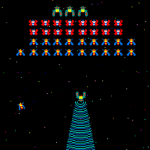
Galaga

Galaga (c) Midway

For the systems  I’m not familiar with (like the N64), I followed the latter route; I just grabbed a huge collection of games.  For the others, I consulted “best of” lists, and downloaded ROMs for the games on those lists.  Of course, I also made sure to get any games I wanted (my number one most important arcade game is Galaga).

To find ROMs, use Google. I ain’t linking to them here.  Besides, ROM sites appear and disappear like gnomes.

The Setup

I installed each of the emulators in C:\Program Files, and all of the ROMs are in C:\ROMs\[console] (so I have C:\ROMs\NES, C:\ROMS\Genesis, etc.).  I’ve also got all the original installation packages for each emulator in My Documents.

I need to back this all up, and to do so I’m going to back up each of the emulators application folders, as well as the installation packages, and the entire contents of C:\ROMs.

If I were to set it up again, I’d create an emulators folder in C:\Program Files and install each emulator within that folder, for easier backups. In fact, I may still do that before I do the backup.

To restore, I’ll restore C:\ROMs, re-install each application, then copy the backed-up application folder on top of the new installation (thus restoring all the settings stored within it).

The Hardware

This is unchanged from before: A hand-made black cabinet, with a platform holding an X-Arcade controller and trackball. The PC is a $200 desktop device, hooked up to the X-Arcade, trackball, basic speakers (mounted inside the cabinet behind several drilled holes), and a 21″ CRT screen that I got for free through Freecycle.

The Conclusion

It took me quite a few hours to get all this working. It was fun, and tiring, and occasionally frustrating. I’m very happy with it.

If you  have any questions, feel free to post in the comments.

No responses yet

Everybody Wave!

May 25 2010 Published by under Technology

Last week, the Google Wave team announced that Wave is now open to everyone. It’s out of beta. Just head over to http://wave.google.com and sign in.

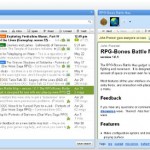
Google Wave screenshot

This is a good time to go over what Wave is and how I’ve been using it.

What Wave Is

Wave is a collaborative communication platform. The creators started by wondering, “What would email look like if it were created today?”

So it’s a way to communicate directly with people. You go to a website, create a conversation (a Wave), and add contacts who can see it.  The first message (blip) is automatically created. You can start typing in it, and your name, profile picture, etc. are displayed next to it.

Anyone included on the conversation can add their own blip(s), anywhere in the conversation (even into the middle of another person’s blip).  Indeed, anyone included in the Wave can edit others’ blips (and then are listed as co-authors of that blip).

Moreover, every modification to every conversation is saved, so you can “rewind” the entire conversation to any point in time.

There’s a simple but effective permission model–you can add someone and only allow them to read the conversation, for example, and you can make conversations editable by the public (or only readable by the public, or keep it completely private).

The main web-based interface to Wave shows three columns:  folders and contacts, your inbox (or the contents of a folder, if selected), and the Wave you’re currently reading.

RPG-Bones Wave extension screenshot

RPG-Bones extension

There are also a number of extensions built by Google and independent developers, which provide all sorts of useful functionality, such as a voting widget, a mapping widget, etc.  Of course, you can also attach images and files to Waves.

More importantly, this is all simple. Everything I described here can be accomplished in a click or two.  It all just works.

What I Use It For

Primarily, I run three tabletop-style RPGs on Google Wave: two Dungeons & Dragons 4th Edition games (The Legacy of the Lines and Sellswords of Tamerane) and a Star Wars: Saga Edition game (Portents of Darkness).

Here’s how I break down the Waves for each game:

  • An Index Wave, with links to all major Waves
  • A Character Wave, listing all the characters, stats, etc.
  • A Party Purse, describing all the items that the group’s carrying individually and collectively
  • A Background, describing the setup and world details
  • A Wave for each scene
  • An OOC Wave for each scene, for out-of-character chat

Once a scene comes to a reasonable stopping point — after 100–200 blips — I start a new scene.

For dice rolling, I use Random Lee Twenty, which looks for standard dice notation like “2d6+5″, calculates the result, and adds it next to the die roll (so “2d6+5″ becomes “2d6+5: 11“).  For combat maps, I use the RPG-Bones extension, as that allows me to overlay a grid, add arbitrary images, zoom, etc.

It works extremely well.  I’m able to run three games simultaneously, which I check in the morning, at lunch, and in the afternoon/evening.  Each normally takes at most 10 minutes to update.

I’ve also used Wave for collaborative document review.  I or a friend create a Wave and type (or paste) some ideas.  We then add others, who add new blips in discussion, or directly fix things.  It works great.

No responses yet

Beautiful Nightmares

May 20 2010 Published by under Reviews

"The Book of Nightmares" by Galway Kinnell

"The Book of Nightmares" by Galway Kinnell

I love poetry, though I know very little about it. I read arguably more poetry than most during my childhood, thanks to my parents and my home-schooling, but poetry’s always been a mysterious, otherworldly thing. Not something I can analyze. Which fits poetry well, now that I think about it.

Such is the case with Galway Kinnell‘s The Book of Nightmares, which I finished reading a few days ago. It’s a themed collection of ten poems on the subjects of death and darkness (and many others, like all good poetry).

I loved it. The poems contained vivid imagery and strong emotion. That’s about all I want out of poetry.

Each poem is written from a first-person perspective and deals with dark themes: discouragement, depression, despair, fear. None of the poems offer easy answers, either; each dives deep into a set of feelings. By the end of the poem, nothing is resolved, though we are often on the other side of those feelings.

These are dense poems. Metaphor overlaps and points both backwards and forwards within each poem. While each one builds using some sort of through line, these are not stories; they are evocations of emotion, and thus harder to grasp and grok than most stories.

After finishing each poem, I felt short of breath. I even read only one poem a day, to maximize the impact of each one.

I found the experience well worth the effort.

No responses yet

Veg

May 19 2010 Published by under Gardening

"Garden Tomatoes" by OakleyOriginals on Flickr

"Garden Tomatoes" by OakleyOriginals on Flickr

I was surprised recently to overhear a co-worker complain that vegetable gardens require a lot of work. Perhaps a large vegetable garden, sure, but they don’t have to be. Vegetables are plants — you put them in good soil and water them frequently, and they grow, all other things being equal.

My setup is pretty straightforward: I bought a bunch of 10-foot 2×6 boards, cut them in 6′ and 4′ sections, and constructed a 6′x4′ open-top box in my back yard, near the house. I then filled it with top-notch potting and vegetable soil.

Every year, I buy seeds from Home Depot (though I’m currently looking for more local options) and spend about 30 minutes planting them. They go in simple rows.  Being single, I don’t need hundreds of green beans, so I only put in half a dozen of each plant. My current crop includes onions, green peppers, tomatoes, green beans, eggplants, and potatoes.

Then I make sure they get plenty of water. I weed occasionally. I wonder if folks are intimidated by that word, “weed.” It conjures up images of undulating acres of crops, and back-breaking work. Not quite in this case; I just spend a couple of minutes every week or so pulling out plants that don’t belong there.  (Otherwise, they crowd out the veggies.)

That’s it. Really. No fertilizer, no hoeing, no mulch. Just harvesting the veggies once they’re ripe.

No responses yet

Why I started using LinkedIn again

May 12 2010 Published by under Technology

LinkedIn logoIn Fortune article published in March, a representative of management consulting firm Accenture revealed that he expects up to 20,000 of Accenture’s new hires this year to come from social media.

20,000.

And knowing the social media landscape, when it comes to professionals using social media, you know that this doesn’t mean hiring through Facebook. The vast majority of those will come through LinkedIn, since that’s by far the most popular professional-oriented social media site.

While I created an outpost on LinkedIn years ago, I haven’t looked at it since. In light of this news, I returned to the site, and made some interesting discoveries:

  • Most of the people I’ve ever worked with are now on LinkedIn.
  • When a contact updates her profile, I’m notified, which gives me the opportunity to talk with her about the change. This is a nigh-perfect conversation starter; who wouldn’t want a message of congratulations or sympathy when their professional life changes?
  • I know a number of people who weren’t on LinkedIn, and I invited to join. Quite a few of them joined; more than I expected.  People seem to increasingly realize LinkedIn’s utility.
  • I’ve already been able to connect a contact looking for work with someone else interested. This is only a few weeks in.
  • People actually discuss topics, maturely and reasonably.
  • There are groups for about every conceivable topic.
  • Groups are plagued by spam. I don’t know why, but for every group I’ve joined, at least half of the discussion topics are individuals advertising their services (“Guaranteed marketing success for your business!”). They don’t appear to be scams, exactly; instead, they’re mildly related advertisements. I’m surprised that group moderators don’t control this.

Overall, I’m glad I’m back.

No responses yet

Artists Wanted

May 11 2010 Published by under Miscellaneous

Ayukawa Madoka by "helloaby" on DevantArt

"Ayukawa Madoka" by helloaby on DeviantArt

What’s the best way to manage an artist?

I have a few top-secret projects going on right now, and they need artists. And by that I mean people who draw people and creatures.

Here’s my process for finding and working with an artist:

  1. Browse art sites. I use DeviantArt mostly, because it’s so big and includes such a wide array of artists.
  2. Send a basic proposal. There’s a delicate balancing act here. I strive to intrigue the artist, while avoiding so much detail that I overwhelm him or her. I do describe my specific art needs, in terms of how many pieces I need, whether they’ll be full-color or black-and-white, etc.
  3. Pay immediately upon receipt. Unfortunately, art is rarely completed in small, discrete pieces, so I can’t just shoot out payments every week. But when I do reach a payment milestone, I pay immediately. As in, I go straight to PayPal.
  4. Check back in weekly. We all get busy. I’ve created a reminder that comes up every Friday, reminding me to email or otherwise contact anyone I haven’t heard from in a week.

Managing my network of artists is a bigger challenge. I’ve been moving a lot of my contact management to LinkedIn, which many artists avoid (presumably because it’s “too business”).

Do you all have any advice?

No responses yet

Amish Friendship Bread

May 06 2010 Published by under Miscellaneous

"Baking soda" by RowdyKittens on Flickr

"Baking soda" by RowdyKittens on Flickr

Ten days ago, a co-worker was kind enough to drop off a bag of starter for some Amish friendship bread. The starter is a light-beige mush that has to be squeezed every day, and fed with extra ingredients (milk, flour, and sugar), until the tenth day.  On the tenth day, one creates four more bags’ worth of starter and bakes two loaves of cinnamon bread with the rest.

As I’m sure you’ve figured out by now:  I made some Amish cinnamon bread yesterday.  While I have yet to try a full slice, I nibbled on the bits that fell off and it was delicious.  Full of flavor and unique personality — this is part coffee cake, part pound cake, with hints of sourdough.

And it’s friendly. It builds a small community.  As you bake, you think of more people to give it to.

Even better, imagine how nice it feels to receive a bit of starter from a friend. Even if you never use the starter.

We could use more nice things like this.

One response so far

Astro Boy Made Modern

May 03 2010 Published by under Miscellaneous

Pluto, volume 2I want to talk about craziness for a moment.

In Japan, there’s a manga creator named Naoki Urasawa.  He’s known for his complex, intricate stories that are aimed at adults.  His most famous is 20th Century Boys, a modern thriller about a middle-aged man who learns that one of his childhood friends now runs a murderous cult.

A few years ago, Naoki Urasawa contacted the son of Osamu Tezuka, Japanese cultural icon and creator of Astro Boy.  Urasawa requested the unthinkable: his own serious, adult adaptation of the most famous Astro Boy story of them all, “The Greatest Robot in History.”

To be clear, this would be something like J.J. Abrams contacting Orson Welles’ estate, requesting permission to do a Lost-style remake of Citizen Kane.  Crazy.

Tezuka’s son admitted that he would normally have dismissed the request out of hand, but Urasawa was so famous, and so famously committed to high-quality storytelling, that he felt it was important to at least meet with him about it.  And as they talked, they discovered a shared passion for the story and the concept.  Urasawa got permission.

He released an 8-volume epic, Pluto, which has won multiple prestigious awards.  It’s a serious, tense geopolitical thriller that touches on modern politics, the nature of heroism, humanity, and man’s relationship to his environment and creations.

Astro becomes a minor character as Urasawa promotes a side character in the original story to the protagonist.  Gesicht, a robot investigator, becomes the main character, as he researches a mysterious killer who’s been murdering high-profile robots.  The plot quickly expands into a global crisis and a convoluted mystery centering around a thinly-veiled version of modern-day Iraq.

Sounds crazy.  But it works.  Urasawa’s clean artwork feels cinematic, always clear but always dramatic.  You can feel the energy behind the characters’ movements.  You can feel the intensity of their concentration.  It ends poignantly and thoughtfully.

All because someone had a crazy idea, and followed up on it.

No responses yet